









The Direct Answer / TL;DR
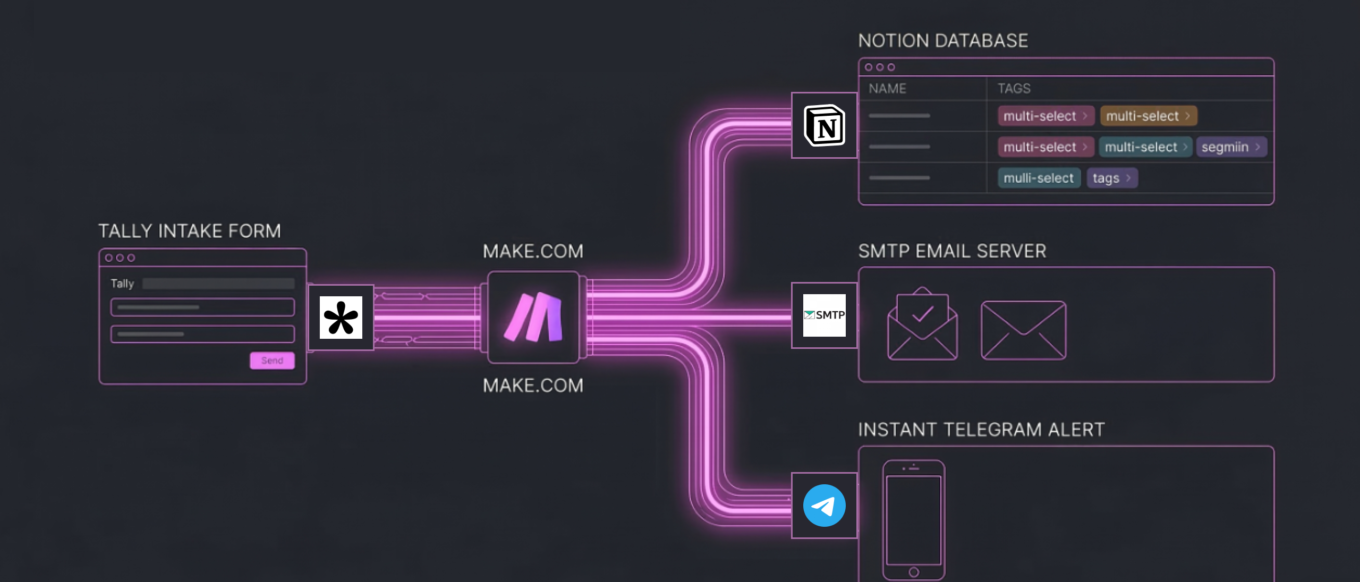
To fully automate a high-ticket B2B Go-To-Market inbound pipeline, I integrate a smart data-capture trigger, an API routing engine, and a dynamic CRM. In this specific architecture, I utilize a webhook-based Tally form to instantly route multi-select JSON data payloads through Make.com. My logic processor simultaneously logs the lead into a Notion database, sends a white-labeled SMTP confirmation email via my custom cPanel domain, and pings my phone using the Telegram Bot API. This completely eliminates manual data entry, guarantees zero data leakage, and reduces my lead response time to less than one second, optimizing the entire product marketing funnel.
The Bottleneck & Product Impact
In my time scaling Web3 and B2B SaaS ecosystems, I’ve seen product marketing velocity consistently bottlenecked by fragmented data systems. Teams will spend thousands of dollars on user acquisition, driving high-intent founders to landing pages, only to capture them with static “Contact Us” forms that dump unstructured data into unmonitored inboxes.
I’ve found that this manual infrastructure creates severe product marketing friction:
- Time-to-Lead Decay: The conversion rate of a high-ticket lead drops by 400% if the response time exceeds five minutes. Manual routing often takes hours or days.
- Data Silos: When I see sales teams forced to manually copy-paste lead bottlenecks from an email into a CRM, human error is inevitable. Critical context is lost.
- The “Black Hole” Experience: When founders submit high-value project details, they want immediate reassurance that their data was received by a professional entity. Silence kills trust.
I believe a true Go-To-Market system requires engineering a closed-loop pipeline where the infrastructure handles the administrative routing. This frees me up as a Product Marketing Manager to focus exclusively on strategic alignment and closing.
My Tech Stack & Logic Flow
Standard integrations (like native Zapier templates) often fail when I need to handle complex data arrays. To build an enterprise-grade pipeline, I rely on a highly specific, API-first stack:
- The Intake (Tally): I choose Tally over Typeform for its superior handling of complex JSON payloads and deep webhook integration, without gating features behind enterprise tiers.
- The Routing Engine (Make.com): I prefer Make.com over Zapier or n8n for this specific build due to its highly visual array iteration and granular control over module-specific error handling and data flattening.
- The CRM (Notion): I utilize Notion as a relational database. Its strict API ensures my data remains clean, forcing my system to categorize leads using dynamic multi-select tags rather than messy text blobs.
- The Client Handoff (cPanel Custom SMTP): I bypass standard Gmail integrations entirely to send white-labeled, plain-text emails directly from my domain’s server (ifezko.com), maximizing deliverability and brand authority.
- The Internal Latency Alarm (Telegram Bot API): I use Telegram over Slack for its lightweight, low-latency mobile notifications, ensuring I get instant pings without the workspace bloat.
The System Architecture: Step-by-Step Build
I construct this pipeline in four distinct phases within the Make.com routing engine.
Phase 1: Payload Capture & The Webhook Trigger
The architecture begins at the point of conversion: my landing page. When a founder submits their project details, Tally packages the data into a JSON payload and fires it to a dedicated webhook I set up in Make.com.
My Make.com Watch New Responses module catches this payload instantly. I designed the system to capture standard strings (Name, Email, Company Website) alongside complex arrays (Multi-select service bottlenecks like “GTM Strategy” and “AI Automation”). I ensure the payload is fully populated during the initial test run so the routing engine maps every variable into its internal memory perfectly.
Phase 2: Database Injection & Array Formatting
I immediately route the raw data to the Notion API module (Create a Database Item). This is where standard pipelines usually break down, as Notion’s API is notoriously strict regarding multi-select properties.
When passing a list of selected services from Tally to Notion, I cannot simply hand over a text string. I have to use dynamic mapping. By activating the advanced mapping toggle within Make.com, I bypass the static dropdown UI and inject the raw array directly into Notion’s payload.
Notion’s API receives this raw array from my routing engine and automatically parses it, generating color-coded, multi-select tags in my CRM in real-time. This ensures my Go-To-Market database remains perfectly segmented without me having to type a single keystroke.
Phase 3: The Client Handoff & SMTP Routing
Simultaneously, my system triggers the custom SMTP email module. Instead of relying on a third-party email client, I authenticate Make.com directly with my server via Port 465 (SSL/TLS).
My module extracts the user’s name and company variables from the Phase 1 payload and injects them into a pre-engineered HTML template. I also dynamically generate a Cal.com booking link containing the user’s variables to remove all friction from the scheduling process. Within one second of hitting “Submit” on the front end, the founder receives a highly personalized, authoritative confirmation email directly from me.
Phase 4: The Internal Alert System
The final node in my architecture connects to the Telegram Bot API via an HTTP API Token. Because Telegram cannot read raw data collections or arrays natively in a text message format, I utilize a nested function in my routing engine when passing array data: join ( map ( [Array] ; value ) ; , ).
This formula commands Make.com to dive into the data collection, extract only the text values, and flatten them into a clean, comma-separated string. My bot then delivers a perfectly formatted alert containing the founder’s details directly to my mobile device.
Edge Cases & Error Handling
I define an elite pipeline by how it handles bad data. During the deployment of this architecture, I engineered specific fail-safes to protect the system:
- The Invalid URL Parameter: Founders frequently submit company websites without the
https://prefix. If my CRM’s “Website” column is strictly formatted as a URL property, Notion’s API will throw a Validation error: Invalid URL and crash the entire pipeline. To handle this edge case, I updated my CRM database schema to accept standard Text for the website parameter, bypassing the strict validation and ensuring 100% data capture regardless of how the user formats it. - The Ghost Queue: If my webhook receives an incomplete test payload, Make.com will queue the ghost data, causing my downstream functions to fail. To fix this, my architecture requires a manual flush of the webhook queue and a fully populated test injection to recalibrate the mapping variables.
The Product Marketing ROI
This technical backend is not just an operational flex; it is my core Product Marketing strategy. My combination of “The Brain (Product Marketing Strategy) + The Muscle (AI Automation)” transforms a standard consulting brand into an enterprise-grade Go-To-Market machine.
By automating the administrative bottleneck, I reduce the speed-to-lead to zero. I elevate the client experience through instant, personalized communication, and I maintain my internal CRM flawlessly. This allows me to dedicate 100% of my bandwidth to deep strategy, ecosystem growth, and closing high-ticket Web3 and SaaS founders.
This is how I scale brands efficiently. This is my architecture for modern Go-To-Market engineering.
The Next Step: Let’s Build Your Engine
If you are tired of manual marketing, leaky sales funnels, and delayed response times, it is time to upgrade your infrastructure. You don’t need another standard agency; you need a Go-To-Market Systems Architect.
Drop your current bottlenecks into my automated intake system at ifezko.com. My backend will instantly process your data, and you will receive a direct link to schedule our strategic alignment call. Let’s scale your brand with precision.